
Grove - IR Distance Interrupter v1.2
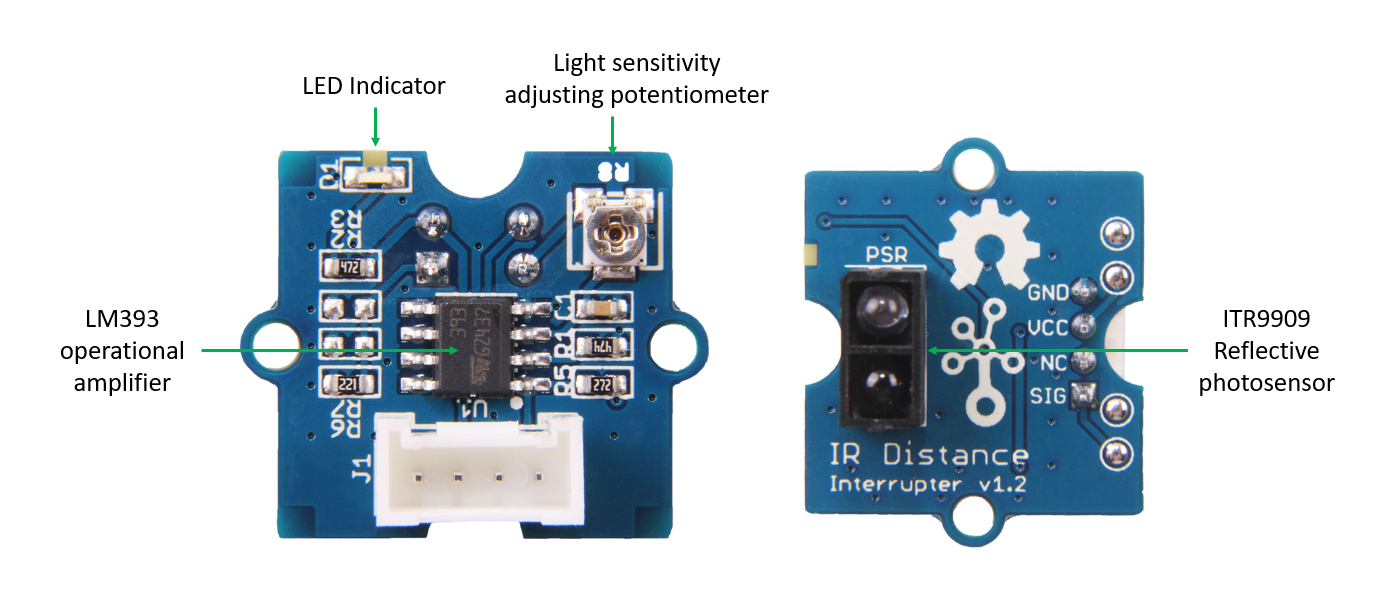
Grove - IR Distance Interrupter is used to detect any object blocking the path of light.
The light emitted by the IR LED gets reflected by any object placed in front of the sensor and this reflection is detected by the photosensor(phototransistor). Any white (or lighter) colored surface reflects more than black (or darker) colored surface.
You can borrow this sensor for testing from Blackbox workshop employe at location IBB: blackbox.ibb-pastoe@hku.nl
When the reflected light is detected, it produces Digital HIGH (or Binary 1) output on the SIG pin. The on-board LED indicator will also glow. If no reflection is detected or if the object is too far from the sensor, the output on the SIG pin stays at Digital LOW (Binary 0). The on-board LED indicator will be off as well.
The detectable range of this sensor is 7.5–40 cm.
There is a potentiometer which can be used to adjust the gain of the amplifier, that is, sensitivity of detection. Use the best fitting scredriver for this and be very sensitive!!!
Note
This product is mildly sensitive to non-IR radiations also and hence any bright light on photosensor impairs or disturbs IR light detection.
Material required
- Grove - IR Distance Interrupter v1.2 × 1
- Arduino UNO (other models also are fine) × 1 + power cable (sold seperately)
- Grove cable × 1 (some sensors come wit cable, different lengths available)
- Grove - Base Shield × 1
Connections
1.Connect Base shield to arduino board Grove, connect IR Distance Interrupter v1.2 to Arduino UNO with Grove cable. port D6
2.Place and hold the Reflective photosensor towards white(or light) colored surface. For adjusting sensitivity read this
3.Create an Arduino sketch and copy the below code into it.
void setup()  {
    Serial.begin(9600);
    pinMode(6,INPUT);
}
void loop()  {
    while(1)  {
        delay(500);
        if(digitalRead(6)==LOW)  {
            Serial.println("Somebody is here.");
        }
        else  {
            Serial.println("Nobody.");
        }
    }
}
5.Connect Arduino to your comuter & Upload the code.
If you do not know how to upload a Arduino sketch, please visit https://www.arduino.cc/en/Guide/Windows for Windows user or https://www.arduino.cc/en/Guide/MacOSX for Mac user.
6.When the path of light is blocked by some object, you would see "Somebody is here." in Serial Terminal else you will see "Nobody."
For connecting with Isadora read this
Source:
https://wiki.seeedstudio.com/Grove-IR_Distance_Interrupter_v1.2/