
Quadrophonic Speaker Setup
Making a quadrophonic speaker setup using 4 speakers, audio interface, pc
Quadraphonic audio and speaker set-up
What is a quadraphonic audio and speaker set-up?
As the word quadra in quadraphonic implies it is a 4 channel audio format and speaker set-up. It is a basic configuration to achieve a simpel immersive audio experience and is considered to be the predecessor of surround sound like the Dolby 5.1 set-up. Within this book we wil show you some examples with different software. The quadraphonic set-up can be used as a classic 4 channel listening experience for 4 channel music pieces, or as a simple immmersive set-up for art installations or performances.
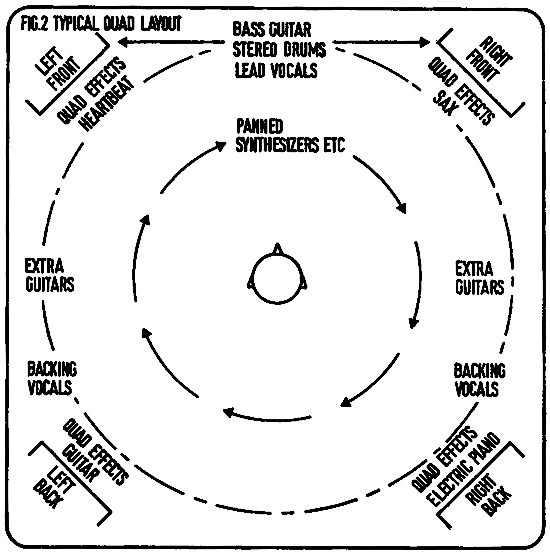
source https://stereosociety.com/foursides/
Required equipment for a quadraphonic audio and speaker set-up.
The following is a list of required equipment. In this configuration we make use of active/powered speakers. It is possible to make a quadraphonic set-up with passive speakers, but it involves 2 extra stereo amplifiers. For more info about that you can contact one of the Blackbox managers at the HKU.
- A computer with a suitable DAW or other type of capable software
- An audio interface with at least 4 audio outputs
- An USB cable for connection to your computer
- 4 x balanced jack to XLR cables (this depends on the type of output and inputs from interface to speakers)
- 4 x XLR cables to extend the jack to XLR cables
- 4 x active speakers1 + power cables
- 4 x stands to place the speakers from the ground up to hearing level
1Important! Always make sure that the volume settings of the interface and in the software are low and controllable and the sound is not playing before you power-up the speakers. Connecting the power or powering up the speakers is a last step after you checked the former steps. Active speakers translate the soundsignal directly into full loudness and have no controllable gain or volume knob. It may cause hearing damage if the volume settings are full open.
Quadraphonics in software
To distribute a single sound channel over 4 or more channels it is useful to use a dedicated tool or plugin for that. Within most DAW's a surround panning effect or plugin is available. But if you want to add it as an interactive element within an spatial installation, you might need to construct one yourself. Node based environments like Max, TouchDesigner and Isadora let you build these tools within the software.
If you want to set-up audio tracks to different outputs within a DAW or Node software without using a panner, check these links:
https://bookstack.hku.nl/books/audio-hardware-software/page/multichannel-audio-in-isadora-and-reaper
https://bookstack.hku.nl/books/audio-hardware-software/page/4-speaker-setup-with-reaper
https://bookstack.hku.nl/books/audio-hardware-software/page/touchdesigner-audio-multichannel-output
The following link wil lead you to different quadrophonic or spatial panner examples within DAW or Node software:
https://bookstack.hku.nl/books/audio-hardware-software/page/quadraphonics-in-software
Thoughts about quadraponic set-ups
A quadraphonic set-up where conventional conical directed speakers are placed in each corner of a room in a 90 degree pattern from one another might nog be the optimal way to listen to a music piece sinds it leaves big acoustic gaps in between the conventional speakers. This creates a lack of overlap between the sounds which are displaced over the channels. An Omniwave speaker might be a better solution, but the character of these speakers are different and are not readily available for most users. So be aware of that when designing your soundscape or music project. But if you want to use a whole space to tell a story, a 90 degree spaced speaker set-up will fulfill the needs.
A step up from a quadrophonic set-up is a dolby 5.1 or 7.1 set-up.
Resources
https://www.wendycarlos.com/surround/surround.html
https://en.wikipedia.org/wiki/Surround_sound
https://en.wikipedia.org/wiki/5.1_surround_sound
https://en.wikipedia.org/wiki/7.1_surround_sound