# Touchdesigner
TouchDesigner is a visual programming environment aimed at the creation of multimedia applications. A realtime creative coding tool to make programming accessible for artists and designers also without a formal programming skills. TouchDesigner allows you to connect “everything to everything" Everything that can be digitised can become an input to a TD application and everything that can be controlled digitally can be output from TD, allowing you to connect the digital world to the real world.
# Getting & installing Touchdesigner
Download Touchdesigner here:
[https://derivative.ca/download](https://derivative.ca/download)
Check the system requirements & download the right version. Install it as usual.
KEy
The NON-COMMERCIAL version is free to use, but has limitations on resolution.
Sing up (free) to get the keys for install.
Check in with the HKUBlackbox if you need to borrow an educational license to unlock certain possibilities.
Check the 'enable dongle' or 'codemeter' box during the install for this.
# Learning Touchdesigner
You can learn Touchdesigner online! The community is 'small' and helpful, to get started check out these resources:
The derivative site:
[https://derivative.ca/learn](https://derivative.ca/learn)
[https://derivative.ca/UserGuide/First\_Things\_to\_Know\_about\_TouchDesigner](https://derivative.ca/UserGuide/First_Things_to_Know_about_TouchDesigner)
[https://learn.derivative.ca/](https://learn.derivative.ca/)
[https://learn.derivative.ca/courses/100-fundamentals/](https://learn.derivative.ca/courses/100-fundamentals/)
**Our recommendations:** These are the TDtutorial masters, they cover a super broad spectrum and help you actually understand the basics:
[](https://www.youtube.com/watch?v=Z_WfldiO6HI&list=PLFrhecWXVn5862cxJgysq9PYSjLdfNiHz&index=1 "TD beginner course")
[elekktronaut.com](https://www.youtube.com/watch?v=Z_WfldiO6HI&list=PLFrhecWXVn5862cxJgysq9PYSjLdfNiHz&index=1 "TD beginner course")
bileam tschepe (elekktronaut)
[youtube](https://www.youtube.com/user/nose2bear/videos) playlist
Very thorough & clear beginners course to get you started.
[Full beginner course ](https://youtu.be/Z_WfldiO6HI?list=PLFrhecWXVn5862cxJgysq9PYSjLdfNiHz)
[](https://bookstack.hku.nl/uploads/images/gallery/2026-09/screenshot-2026-09-17-at-22-04-25.png)
[Pao Olea](https://www.youtube.com/@pao_olea "Pao Olea")
Clear explanations and playful experiments
[Playlist](https://www.youtube.com/playlist?list=PLCQm2_dRv60W6GZGGV3Uw2qZueZ5c4LOJ) of beginner tutorials
[@acrylicode](https://www.youtube.com/@acrylicode "youtube")
In this channel you will teach how to use Touchdesigner as a creative tool.
[Playlist](https://www.youtube.com/playlist?list=PLZeDM2TloijWODqRjQrE_WwoK1inYP1PX) of beginner tutorials
[https://matthewragan.com/](https://matthewragan.com/)
Matthew Ragan
[youtube](https://www.youtube.com/@raganmd/videos) playlist
Very clear & thorough tutorials, that really help you understand what you are doing.
[https://interactiveimmersive.io/](https://interactiveimmersive.io/)
The Interactive & Immersive Headquarters
[youtube playlist](https://www.youtube.com/watch?v=hDHui-lxRw0&list=PLpuCjVEMQha9_WchDzqG878GtsJd1uJ5s)
The Interactive and Immersive HQ has a mission: Help TouchDesigner freelancers, agencies, artists and designers achieve their artistic visions.
[](https://bookstack.hku.nl/uploads/images/gallery/2025-03/screenshot-2025-03-19-at-20-06-07.png)
[Okamirufu Vizualizer](https://www.youtube.com/@OkamirufuV)
Okamirufu Vizualizer
Youtube channel
This channel is for TouchDesigner Enthusiast. Tutorials using static screenshots of the network & clear explanation.
Here's a [playlist](https://youtube.com/playlist?list=PL0UTrJQehb2MMDdTpnSE-qSAPajVGbiMK&si=bZi_90rXT-QcHcHj) on youtube full of inspiring tutorials by various makers, new ones are added on a regular bases. tips to add welcome!
Check out ALLTD:
beginners: [https://alltd.org/category/beginner/](https://alltd.org/category/beginner/)
intermediate: [https://alltd.org/category/intermediate/](https://alltd.org/category/intermediate/)
advanced [https://alltd.org/category/advanced/](https://alltd.org/category/advanced/)
Some of out favourite tutorial makers:
[https://www.youtube.com/@elekktronaut](https://www.youtube.com/@elekktronaut)
[https://www.youtube.com/@TheInteractiveImmersiveHQ](https://www.youtube.com/@TheInteractiveImmersiveHQ)
[https://www.youtube.com/@paketa12](https://www.youtube.com/@paketa12)
[https://www.youtube.com/@OkamirufuV](https://www.youtube.com/@OkamirufuV)
[https://www.youtube.com/@acrylicode](https://www.youtube.com/@acrylicode)
[https://www.youtube.com/@rey\_nbows](https://www.youtube.com/@rey_nbows)
[https://www.youtube.com/@raganmd](https://www.youtube.com/@raganmd)
[https://www.youtube.com/@NotoTheTalkingBall](https://www.youtube.com/@NotoTheTalkingBall)
[https://www.youtube.com/@pppanik007](https://www.youtube.com/@pppanik007)
more touchdesigner resources
[https://github.com/monkeymonk/awesome-touchdesigner](https://github.com/monkeymonk/awesome-touchdesigner)
#####
**Stuck?**
Check out help on:
The Forum: [https://forum.derivative.ca/](https://forum.derivative.ca/)
Discord: [https://discord.com/invite/senqbr2](https://discord.com/invite/senqbr2)
Reddit: [https://www.reddit.com/r/TouchDesigner/](https://www.reddit.com/r/TouchDesigner/)
Facebook community :
[TouchDesigner Artist Community (fb)](https://www.facebook.com/groups/235612494392957)
[TouchDesigner Help Group](https://www.facebook.com/groups/225822177583790)
[TouchDesigner Help Group Netherlands](https://www.facebook.com/groups/1006478572702131)
or contact a Blackbox host!
##### **Cheat Sheets:**
Common Python operations: [https://matthewragan.com/teaching-resources/touchdesigner/touchdesigner-common-operations-cheat-sheet/](https://matthewragan.com/teaching-resources/touchdesigner/touchdesigner-common-operations-cheat-sheet/)
Keyboard Shortcuts: [https://matthewragan.com/teaching-resources/touchdesigner/touchdesigner-keyboard-shortcuts/](https://matthewragan.com/teaching-resources/touchdesigner/touchdesigner-keyboard-shortcuts/)
##### Integration with Resolume
https://vjgalaxy.com/blogs/touchdesigner-tutorials/enhancing-resolume-with-real-time-vj-visuals-generators
# Mediapipe for bodytracking in TD: No kinect needed!
Realtime Body tracking on Mac & Pc with just a webcam!
Camera's like Kinect can do body & facial tracking with infra red. You can read more about this on [another one of our bookstack pages](https://bookstack.hku.nl/books/3d-depth-cameras-motion-tracking "3d-depth-cameras").
But with AI, you can now also use your webcam for tracking!
Mediapipe is Machine Learning by Google implemented through Python;
read up on the details here; [https://developers.google.com/mediapipe](https://developers.google.com/mediapipe)
And if this kind of goes above your head but you do kind of want to understand what you are doing check this out: [https://www.assemblyai.com/blog/mediapipe-for-dummies/](https://www.assemblyai.com/blog/mediapipe-for-dummies/)
You can install Mediapipe on you computer and in Touchdesigner using this step by step tutorial: [http://www.magicandlove.com/blog/2021/06/02/mediapipe-in-touchdesigner-6/](http://www.magicandlove.com/blog/2021/06/02/mediapipe-in-touchdesigner-6/)
But, since 2023 Torin Blankensmith has developed a plugin for TD (so no separate install of mediapipe!)
Check out the [tutorial](https://youtu.be/83StND-y4fY)
Get the latest version of the plugin on [github. ](https://github.com/torinmb/mediapipe-touchdesigner?tab=readme-ov-file)
*Be aware that, although this way of using Mediapipe is much easier to setup, it is a lot heavier on your system/resources than when installing the necessary libraries yourself like described above.*
# .Tox
[](https://bookstack.hku.nl/uploads/images/gallery/2025-03/screenshot-2025-03-21-at-09-55-17.png)
A .tox file is a **TouchDesigner Component file**, used to save preset- components of yourTouchDesigner project. A .tox file contains one component which in turn can contain multiple components. The component file can then easily be loaded as needed in other projects. For example, when designing a custom user interface for a project, saving the UI elements as a separate .tox file would allow the parts of the user interface to be reused easily in future projects.
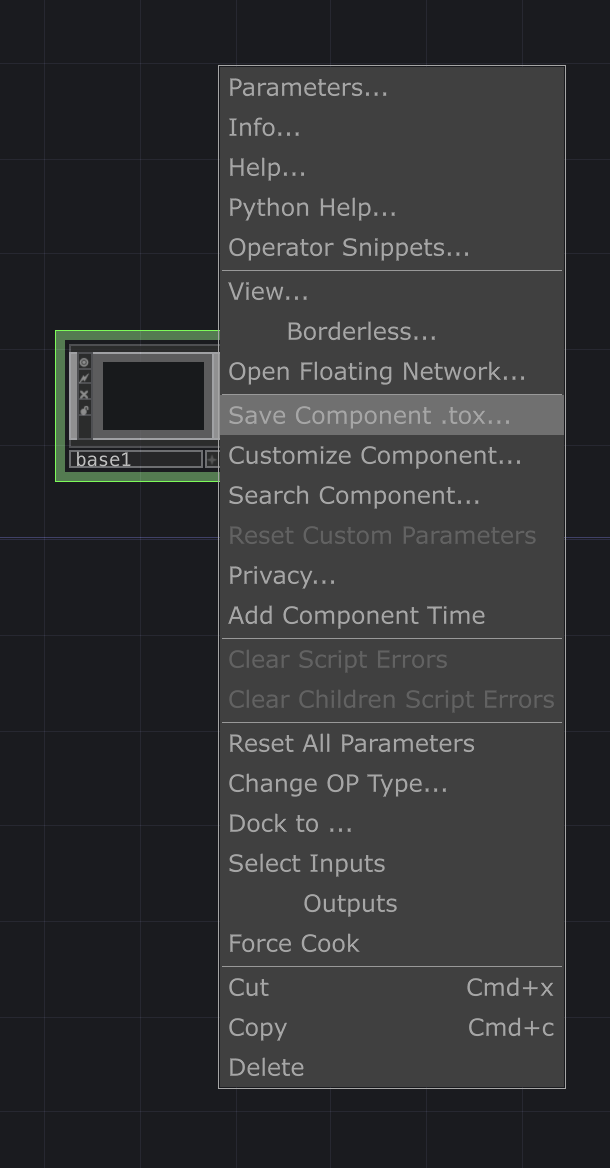
To create a .tox right-click on your (base) component & hit "Save Component .tox'
Navigate to your Palette & add them there for easy acces.
On this page we'll share some custom toxes made previously in Touchdesigner (by us).
Beware, these are handmade, to fully understand what is happening, it is advised to re-build them yourself ;)
On Github:
[https://github.com/hku-ect/TouchDesignerComponents](https://github.com/hku-ect/TouchDesignerComponents)
Showcase:
On the derivative site, people have profiles & sometimes share their .tox
[derivative: showcase](https://derivative.ca/showcase)
especially:
[THETOUCHLAB](https://derivative.ca/user/361107/profile "THETOUCHLAB")
Add a sensor to callibrate it [sensor\_callibrate.tox](https://bookstack.hku.nl/attachments/89)
Library-platform of inspiring TD Toxes shared by creators:
[https://olib.amb-service.net/](https://olib.amb-service.net/)
Toxes for specific fixtures to control lights can be found [here](https://bookstack.hku.nl/books/touchdesigner/page/controlling-lights-from-touchdesigner)
WLed [WLED.tox](https://bookstack.hku.nl/attachments/88)
[Bare\_Conductive.tox](https://bookstack.hku.nl/attachments/42)
to use Bare Conductive in TD
[more info here](https://bookstack.hku.nl/books/bare-conductive "Bare conductive")
[RadiusCheck.tox](https://bookstack.hku.nl/attachments/43)
Creates a virtual point in 3D space and checks the relation between input XYZ. Set the radius in metres Set the XYZ location feed it a live location (XYZ) Outputs Percentage within the radius Outputs InsideBounds Outputs Distance in Metres
[sceneswitcher2.tox](https://bookstack.hku.nl/attachments/100)
Allows you to select 1 scene at a time & disable other scenes. Handy to save resources or stop triggers from reacting when not in focus.
# examples (random selection)
# Lights in Touchdesigner
You can control your fixtures straight from Touchdesigner, using an Enttec or over ArtNet
# Controlling Lights from Touchdesigner
{{@342}}
# Controlling Ledstrips with WLED (from Touchdesigner)
{{@318}}
# Arduino & Touchdesigner
You can connect your arduino to TD to send & receive data
# Various tutorials connecting TD & Arduino (no firmata)
# Using Firmata
### What is Firmata?
**Firmata** is a protocol for communicating with microcontrollers (like Arduino) from software on a computer, using a standardized messaging format over serial communication (usually USB). It allows you to **control and read from Arduino pins in real-time**, without needing to constantly upload new Arduino sketches.
- **Firmata** is like a translator that is programmed on the Arduino.
- You upload a **Firmata sketch** once to the Arduino.
- Then, you can control the Arduino **live from TouchDesigner (or other software like Isadora, Max/MSP or Processing)** without reprogramming it.
- Be aware that is is resource heavier the programming your Arduino with specific code for the goal you want to achieve, Nice for prototyping though!