conduction sensors, trigger controllers
Makey Makey, I-PAC, and Bare Conductive are all trigger controllers: devices that let you turn everyday actions into digital inputs, connecting the real world to your computer. They are often used because they make interaction tangible and playful.
-
Makey Makey works like a keyboard or gamepad. By connecting alligator clips to conductive objects (fruit, foil, people), touching those objects completes a circuit. Each touch becomes click on the computer.
-
I-PAC (Interface for PC to Arcade Controls) is like a MakeyMakey but with all the options your keyboarrd has.
-
Bare Conductive lets surfaces themselves become interactive — conductive paint, materials or objects objects -Touching or even approaching the area sends signals that can be used to trigger sounds, visuals, or other digital outputs.
BC sends values whereas MakeyMakey & Ipac send trigegr signals (0/1).
What they share is the principle of conductivity: the body or a conductive material closes a circuit, creating a trigger.
Other touchboard added to this list, go to their page for description and information on where to get them and how to use them.
- makey makey
- IPAC
- Bare conductive
- Playtronica BIOTRON midi controller touchboard
- Playtronica TOUCHME midi controller touchboard
- Adafruit MPR121 12-Key Capacitive Touch Sensor Breakout
- MIDI MADNESS MAKER
- ATARI PUNNIK CONSOLE
- Spad_Electronics synth biodata sonification midisprout
- t-t-t-t (textile touch to tones)
makey makey
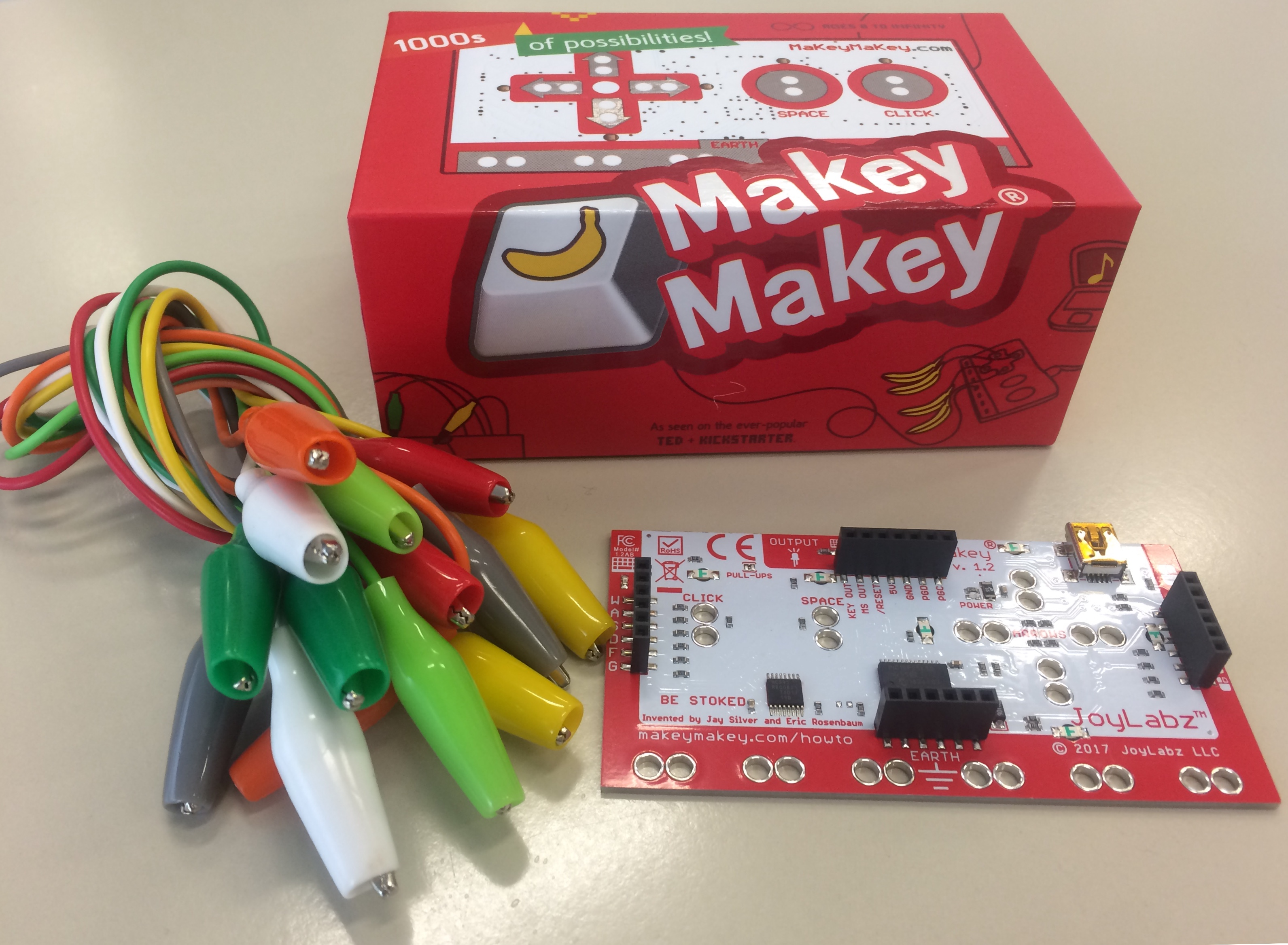
Design your own controller with everyday materials like foil, velostat, playdough, graphite pencils, water or any other conductive material. Lots of info and examples on their own site: https://makeymakey.com
No need to install drivers , makey makey is plug and play.
Attach it through usb to your computer, close a circle of conduction bij connecting 'ground' and 'another trigger' & it shows up to be an external keyboard. Read the signal in an app like wordpad/texteditor to make sure you have the right connection.
In data flow software (like Isadora & touchdesigner) the makey is read through nodes like a 'keyboard In watcher' or 'KeyBoardIn'
Remember to always playtest your setup, as using a keyboard as input may also lead to unexpected/unwished results (like you interface being all over the place :)
Also see this page: aan-de-slag-met-makey-makey
Borrow Makey from the uitleen at IBB of PASTOE
or the Blackbox @ JK
Or in a tech case!
see ipac for a makey on steroids
IPAC
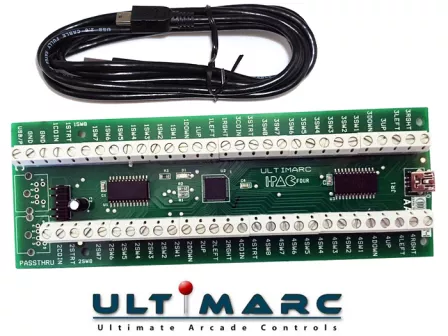
your external keyboard, made of anything conductive
aka the makey makey on steroids :)
The I-PAC2 has 32 inputs which are all programmable and are marked as 2 joysticks, 8 buttons each, plus coin1, coin2, start1, start2 and MAME control keys. Any inputs can be assigned as a shift key to access an alternate code set. I-PAC is the ONLY keyboard encoder where each input inputs has it's own dedicated microprocessor pin. No interaction or delays, vital for multi-button games such as fighting games. I-PAC is much more than a keyboard encoder! Pins can be configured as mouse buttons or game controller buttons, plus power and volume control. I-PAC is the ONLY keyboard encoder which emulates a USB keyboard and yet breaks through the USB simultaneously-pressed-switch limit of 6 switches (plus ctrl,alt,shift) which afflicts all USB keyboard devices. I-PAC is the ONLY device to have a shift function which allows ANY input to be assigned to a shifted secondary keycode and the shift button can have it's own function too so no need for a dedicated extra control panel button. I-PAC is the ONLY device to have a self-test LED which not only gives an instant visible check of your installation but also can indicate which connection (if any) is causing a problem. I-PAC retains it's programming after power off. Not all keyboard encoders do this!
read up on specs here or here:
https://www.ultimarc.com/control-interfaces/i-pacs/i-pac4-board/
download custon software: https://www.ultimarc.com/download.html
mapping:
| INPUT | NORMAL CODES | CODES WITH SHIFT (hold 1 player start) |
|---|---|---|
| COIN 1 | 5 | |
| COIN 2 | 6 | |
| START 1 | 1 | |
| START 2 | 2 | ESC |
| 1 RIGHT | R arrow | Tab |
| 1 LEFT | L arrow | Enter |
| 1 UP | U arrow | Key Below ESC (Volume, gamma, etc ) |
| 1 DOWN | D arrow | P (pause) |
| 1 SW 1 | L-ctrl | 5 (Coin A) |
| 1 SW 2 | L-alt | |
| 1 SW 3 | space | |
| 1 SW 4 | L-shift | |
| 1 SW 5 | Z | |
| 1 SW 6 | X | |
| 1 SW 7 | C | |
| 1 SW 8 | V | |
| 1 A | P | |
| 1 B | ENTER | |
| START 1 | 1 | |
| START 2 | 2 | Esc |
| 2 RIGHT | G | |
| 2 LEFT | D | |
| 2 UP | R | |
| 2 DOWN | F | |
| 2 SW 1 | A | |
| 2 SW 2 | S | |
| 2 SW 3 | Q | |
| 2 SW 4 | W | |
| 2 SW 5 | I | |
| 2 SW 6 | K | |
| 2 SW 7 | J | |
| 2 SW 8 | L | |
| 2 A | TAB | |
| 2 B | ESC |
Bare conductive
we have a separate page for that! https://bookstack.hku.nl/books/bare-conductive
Playtronica BIOTRON midi controller touchboard
General info
Play with your favorite plant and let nature compose your music. As the plant's natural electrical properties change, the sound evolves, creating a unique musical experience every time.
You can also connect this to software like Isadora or Touchdesigner to activate other outputs.
https://help.playtronica.com/plant-sound
you don't need to update the firware, this is already done by the Blackbox employe
https://shop.playtronica.com/products/biotron
How to use it
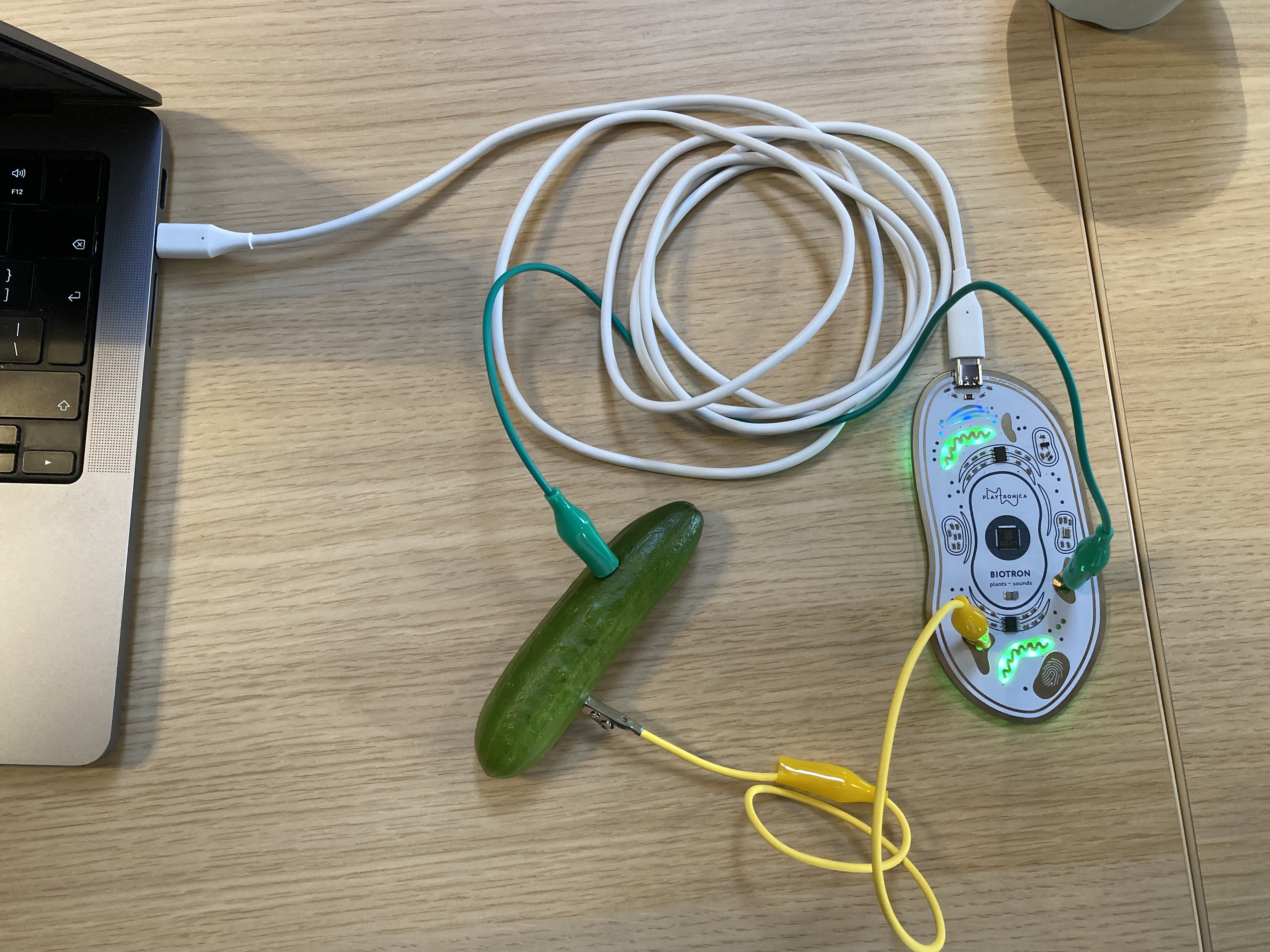
- Connect the Usb C cable with the Biotron and your computer
- Connect two cables with alligator clips to a plant, vegetable or something else organic and juicy.
- Wait a few seconds until the green lights in the Biotron start to pulsate...... remember to be patient
- Select the Biotron device (Biotron (Port 1)) as your midi device within your favourite audio program or other piece of midi munching software
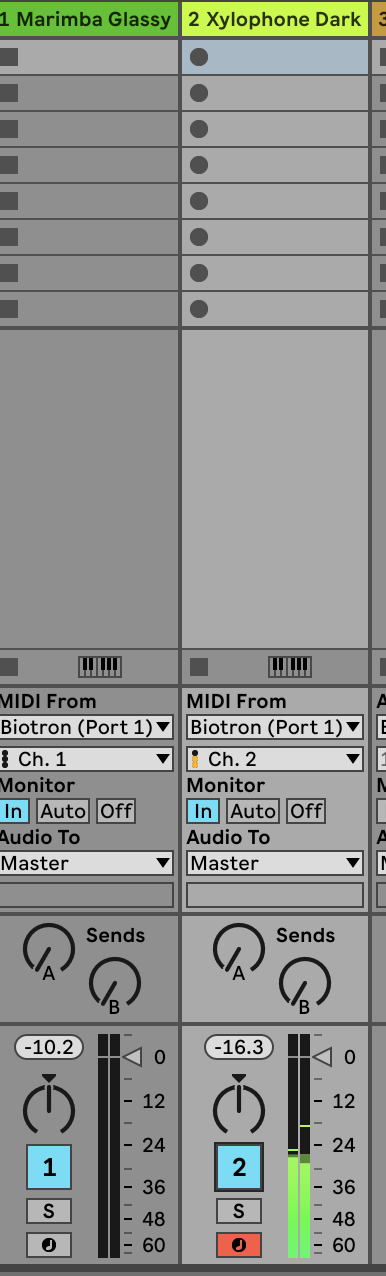
- Set one synth to midi channel one for generated notes from the plants
- Set another synth to midi channel two for pulsating notes
- Other then Audio software like Ableton you can also use online tool like midi.city(chrome only) to test the connection or play with your plant, vegetable or juicy organics.
This Bookstack is WIP...
for now Contact Blackbox employe to borrow this device and for help: blackbox.ibb-pastoe@hku.nl
Playtronica TOUCHME midi controller touchboard
Get your hands on TouchMe, the musical instrument that turns skin, water, or flowers into sound.
Play with friends or alone. As the area of touch and intensity changes, the sound changes too.
You can also connect this to software like Isadora or Touchdesigner to activate other outputs.
https://shop.playtronica.com/products/touchme
Summary:
1: connect TouchMe through mini usb cable to your computer.
2: open synth.playtronica.com in google chrome browser (other browser doesn't work) after connecting the TouchMe to your computer.
3: choose a synth (not WebSID Commodore 64 , Playtronica Sampler or Viktor NV-1)
4: grab both of the conductive sides of TouchMe.
apply some pressure,
variations of this pressure will trigger higher pitch notes or lower pitch notes.
Touchme stuurt op 1 poort uit
Biotron stuurt op 2 poorten uit
All other settings: https://help.playtronica.com/touchme
Contact Blackbox employe to borrow this device and for help: blackbox.ibb-pastoe@hku.nl
Adafruit MPR121 12-Key Capacitive Touch Sensor Breakout
Add lots of touch sensors to your next microcontroller project with this easy-to-use 12-channel capacitive touch sensor breakout board, starring the MPR121. This chip can handle up to 12 individual touch pads.
https://learn.adafruit.com/adafruit-mpr121-12-key-capacitive-touch-sensor-breakout-tutorial/overview
You can also connect this to software like Isadora or Touchdesigner to activate other outputs.
Tutorial follows later. This Bookstack is WIP...
for now Contact Blackbox employe to borrow this device and for help: blackbox.ibb-pastoe@hku.nl
MIDI MADNESS MAKER
The MIDI MADNESS MAKER, is a standalone DIY syntheseizer and MIDI controller interface you can make yourself with a focus on capacitive touch data. With Midi Madness Maker you can create your own tactile controller translating touch to MIDI control and CC messages over TRS-Midi jack- 5 pin DIN or Wireless over Bluetooth.
https://acidsolderclub.com/2025/05/29/midi-madness-maker/
You can also connect this to software like Isadora or Touchdesigner to activate other outputs.
Tutorial follows comes later. This Bookstack is WIP...
for now Contact Blackbox employe to borrow this device and for help: blackbox.ibb-pastoe@hku.nl
ATARI PUNNIK CONSOLE
The Atari Punnik Console is based on the famous and well known “Atari Punk Console” diy beginner synth, and works the exact same way accept it is modded and redesigned to work with touch and conductive materials as well such as E-textiles, conductive yarn, nails, screws, copper, random dead electronics and body contacts.
https://acidsolderclub.com/2025/05/29/atari-punnik-console/
You can also connect this to software like Isadora or Touchdesigner to activate other outputs.
Tutorial follows later. This Bookstack is WIP...
for now Contact Blackbox employe to borrow this device and for help: blackbox.ibb-pastoe@hku.nl
Spad_Electronics synth biodata sonification midisprout
Unlock the full potential of plants with Symbiotic - the ultimate plant-based musical instrument. Based on the open-source MidiSprout Biodata Sonification project, our device captures plants' micro electrical variations and transforms them into MIDI, CV, gate, and trigger signals for synthesizers. A perfect fit for makers and DIY enthusiasts, Symbiotic allows you to create truly unique and organic sounds using the natural world. Whether you're a musician, artist, or just a nature lover, Symbiotic is the perfect addition to your studio or home. Features: - Captures plants' micro electrical variations - Transforms them into MIDI, CV, gate, and trigger signals - Available as both a DIY kit and fully assembled - Create truly unique and organic sounds - Open source project
https://bookstack.hku.nl/books/bio-data-sonification-using-midi
https://www.tindie.com/products/spadelectronics/diy-synth-biodata-sonification-midisprout/
You can also connect this to software like Isadora or Touchdesigner to activate other outputs.
This Bookstack is WIP...
Contact Blackbox employe to borrow this device and for help: blackbox.ibb-pastoe@hku.nl
t-t-t-t (textile touch to tones)
https://v0ss3n.github.io/tttt/
https://www.instagram.com/michellevossen_/reel/DJ_U-vNND_K/
https://www.instagram.com/reel/DM7G3G_Ngbl/?utm_source=ig_web_copy_link&igsh=MzRlODBiNWFlZA%3D%3D
https://v0ss3n.github.io/tttt/update.html
You can also connect this to software like Isadora or Touchdesigner to activate other outputs.
This Bookstack is WIP...
for now Contact Blackbox employe to borrow this device and for help: blackbox.ibb-pastoe@hku.nl