# MIDI (Musical Instrument Digital Interface)
This book contains information about the history of MIDI, the technical theory, it's creative uses and future development.
# Wat is MIDI?
##### **Inleiding**
MIDI staat voor *Musical Instrument Digital Interface* en is een communicatieprotocol dat begin jaren ’80 werd ontwikkeld om elektronische muziekinstrumenten, computers en andere apparaten met elkaar te laten communiceren. In tegenstelling tot audio bevat MIDI geen geluid, maar beschrijft het **wat** er gespeeld wordt: welke noot, hoe hard, hoe lang en met welke expressie.
Dit document geeft een overzicht van wat MIDI is, hoe het wordt gebruikt, welke parameters er zijn, en wat de voor- en nadelen zijn. Midi wordt ingezet om te werken met muziek, geluid en interactieve media.
##### **Wat is MIDI?**
- MIDI is een digitaal communicatieprotocol, geen audioformaat.
- Ontwikkeld om verschillende elektronische instrumenten en systemen met elkaar te laten samenwerken.
- Werkt met een resolutie van **7-bit (0–127)** per parameter.
- Hogere resolutie (**14-bit, 0–16383**) is mogelijk via *(Non-)Registered Parameter Numbers* ((N)RPN).
- MIDI is robuust, betrouwbaar en geschikt om meerdere apparaten in een keten (daisy-chain) aan te sturen.
**Fysieke en digitale verbindingen**
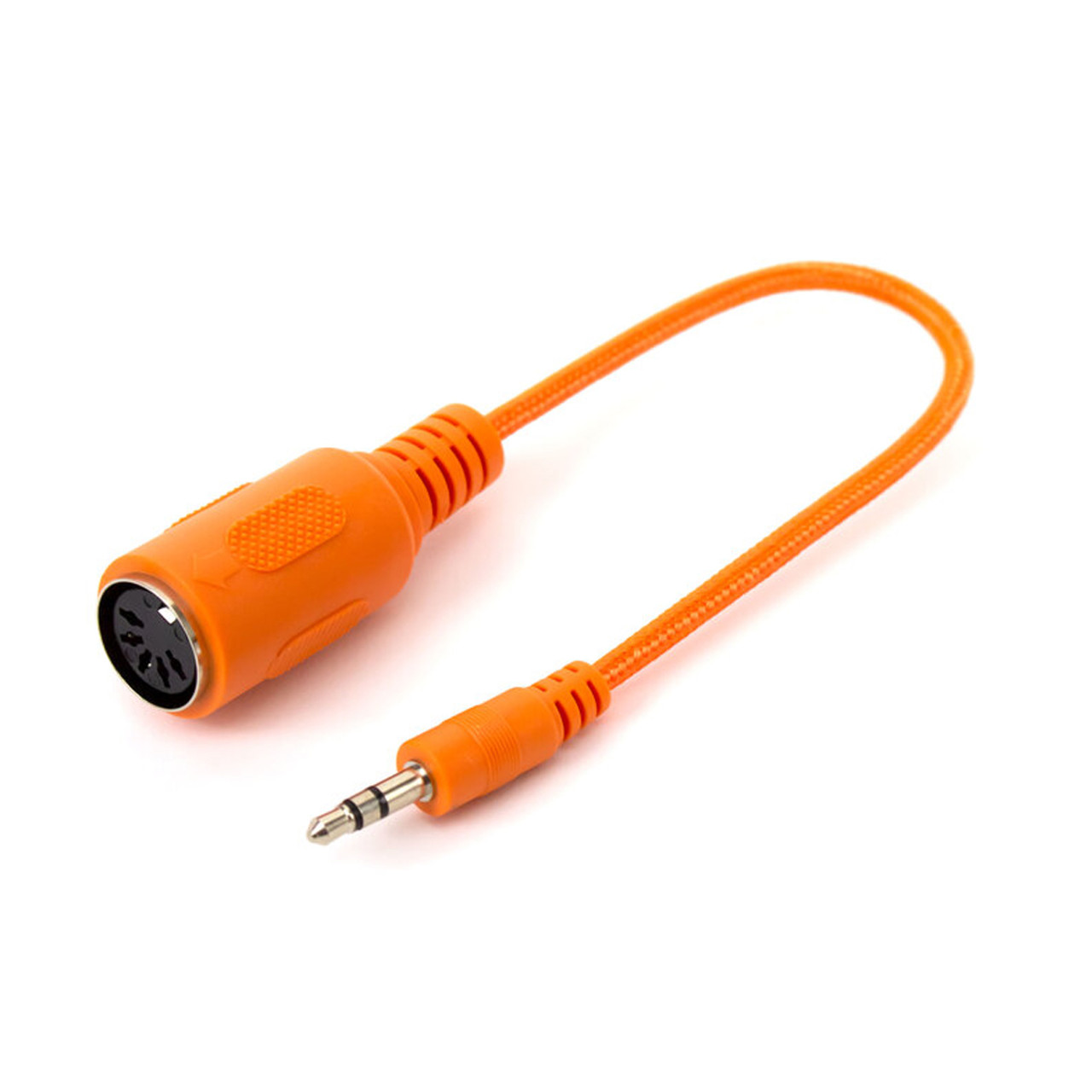
- Oorspronkelijk: **5-polige DIN MIDI-kabel** (eenrichtingsverkeer).
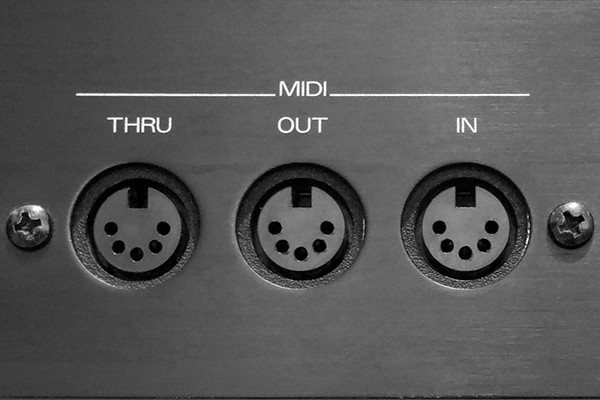
- Poorten van synthesizers bevatten vaak 3 variaties: Midi in, Midi out & Midi through (voor het doorlussen naar andere apparaten)
- Tegenwoordig ook via:
- USB
- Vast netwerk (Ethernet)
- WiFi
- Bluetooth (bijv. WIDI)
- Compacte varianten: **TRS-MIDI Type A of Type B** (afhankelijk van fabrikant).
- Zie [https://minimidi.world/](https://minimidi.world/) voor een "A simplified guide to TRS MIDI"
[](https://bookstack.hku.nl/uploads/images/gallery/2026-02/cable-a.jpg)
*[ ](https://bookstack.hku.nl/uploads/images/gallery/2026-02/midi-in-out-thru.jpg)*
*Midi ports of a device with an in, out and through connector TRS (Tip Ring Sleeve) naar Midi DIN plug*
##### **Het gebruik van MIDI**
MIDI wordt gebruikt in uiteenlopende toepassingen:
- Muziekproductie (DAW’s zoals Ableton Live, Logic, Reaper)
- Live performances
- Aansturen van synthesizers en drumcomputers
- Licht- en visual synchronisatie
- Installaties en interactieve kunst
- Sensor- en Arduino-projecten
MIDI vormt vaak de ‘ruggengraat’ van een setup waarin meerdere systemen synchroon moeten werken.
##### **Belangrijkste MIDI-parameters**
**Kanalen**
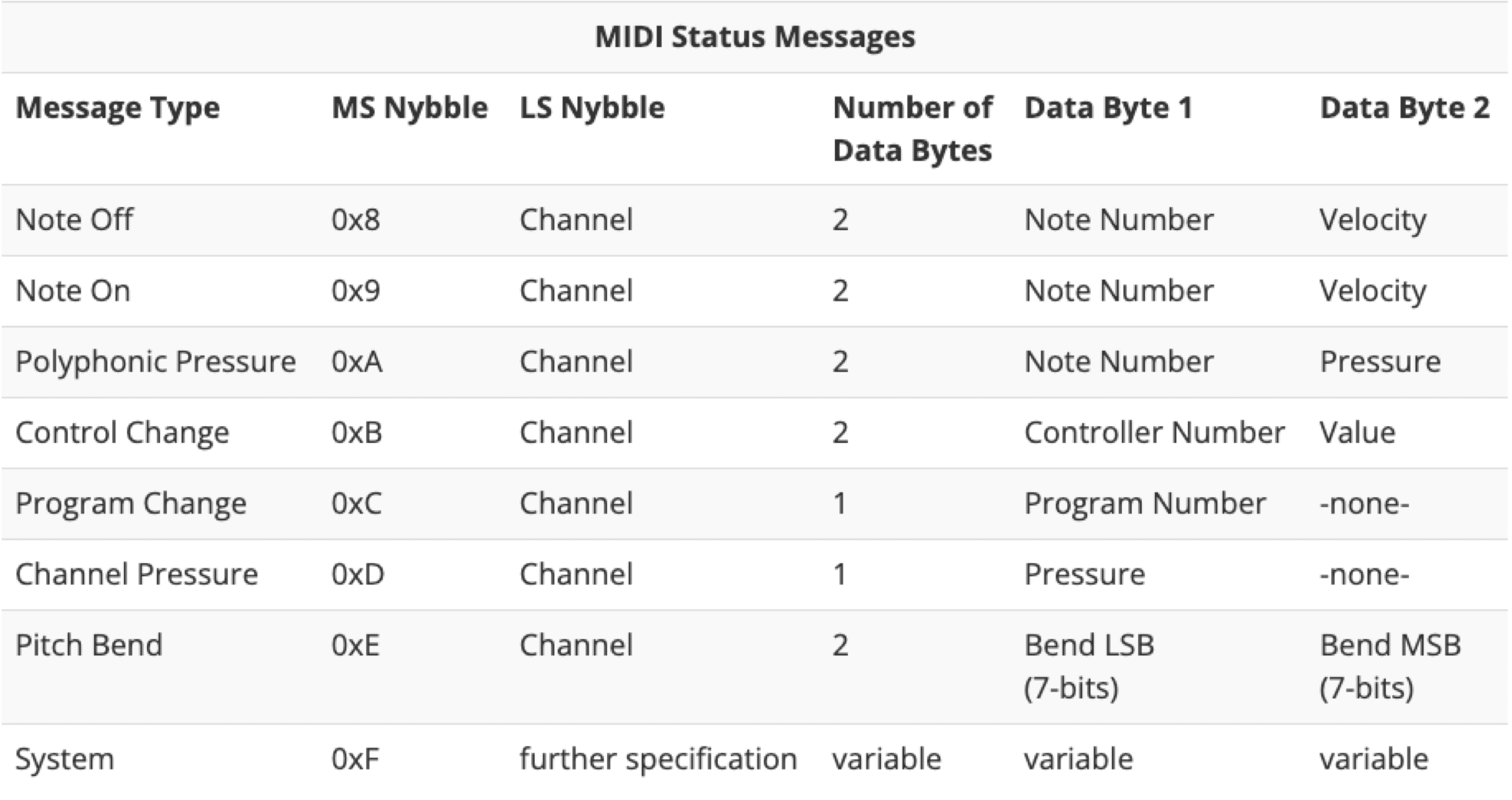
- MIDI werkt met **16 kanalen (1–16)**.
- Elk kanaal kan een ander instrument of functie aansturen.
**Noten en expressie**
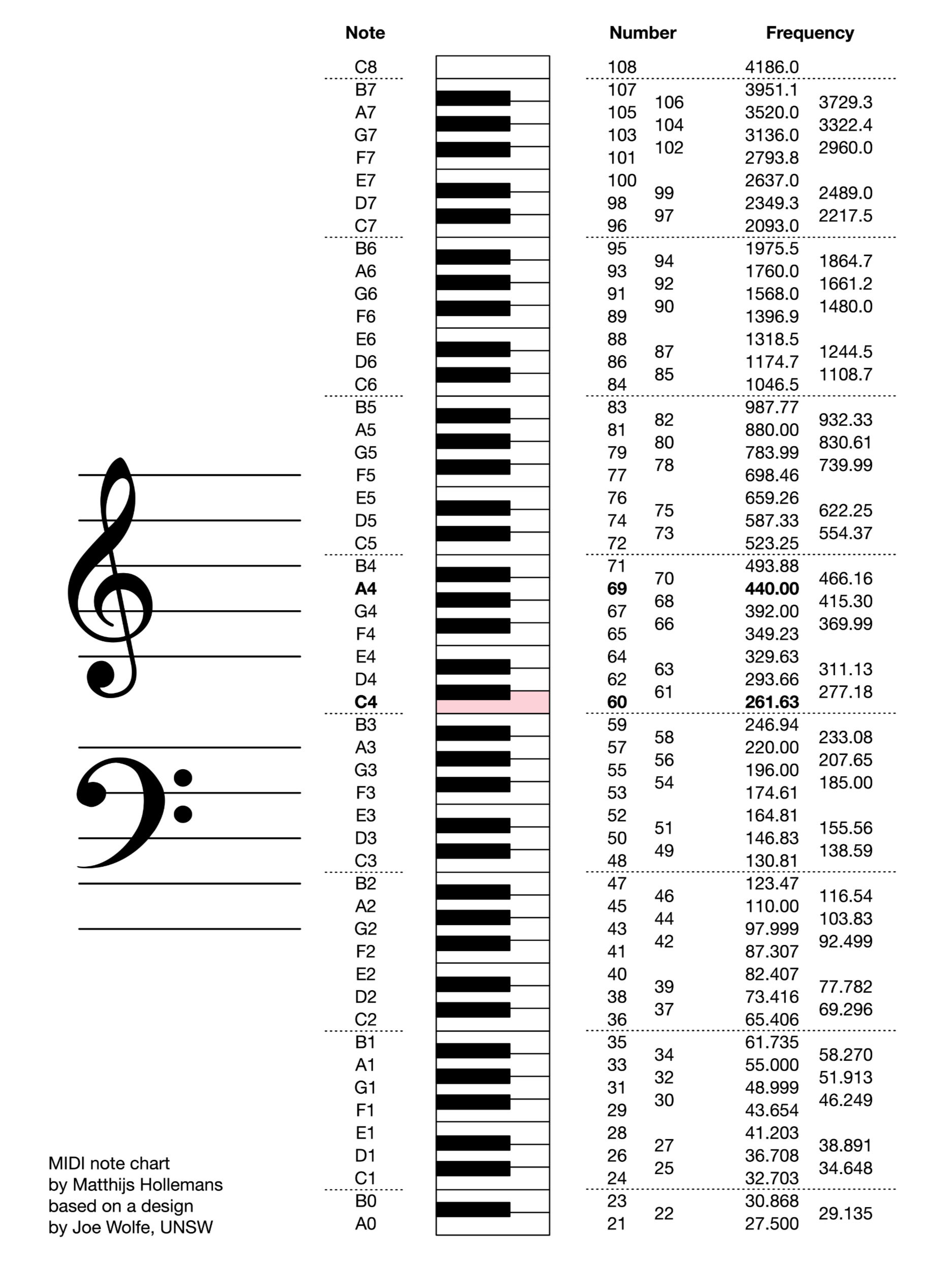
- **Note Number** – toonhoogte (bijv. A0 t/m C8)
- **Note On / Note Off** – start en einde van een noot
- **Velocity** – aanslaggevoeligheid (hoe hard een noot wordt gespeeld)
- **Aftertouch** – extra expressie na het indrukken van een toets (monofoon of polyfoon)
**Control Change (CC)**
- Wordt gebruikt om parameters aan te sturen zoals filter cutoff, resonantie of effect-niveaus.
- Elke CC heeft een nummer (0–127).
**Overige belangrijke berichten**
- **Pitch Bend** – continue toonhoogteverandering
- **Modulation Wheel** – vaak toegewezen aan vibrato of expressie
- **Program Change** – wisselen van presets of patches
- **System Exclusive (SysEx)** – apparaatspecifieke data (instellingen, backups, updates)
- **MIDI Clock** – tempo- en tijdssynchronisatie (BPM)
[](https://bookstack.hku.nl/uploads/images/gallery/2026-02/screenshot-2026-02-05-at-15-43-07.png)
*De opbouw van de belangrijkste Midi parameters*
##### **MIDI en muzikale perceptie**
Muzikale eigenschappen kunnen direct worden gekoppeld aan MIDI-parameters:
- **Toonhoogte (Pitch)** → Note number, filter cutoff
- **Duur (Duration)** → Note on/off, envelope release
- **Luidheid (Loudness)** → Velocity, volume, amplitude
- **Klankkleur (Timbre)** → ADSR, oscillator vorm, filters, effecten
- **Textuur** → Arpeggiators, sequencers, polyfonie
- **Ruimtelijkheid** → Pan, reverb, delay
MIDI fungeert hierbij als vertaallaag tussen muzikale intentie en technische uitvoering.
[](https://bookstack.hku.nl/uploads/images/gallery/2026-02/midi-note-chart.jpg)
*Conversiekaart waar van links naar rechts de noten (A0 t/m C8) met corresponderende midi nootnummers (21-108) en frequenties (27,5 Hz t/m 4186 Hz) uit af te lezen zijn.*
##### **MIDI implementation charts**
Een **MIDI implementation chart** beschrijft welke MIDI-berichten een apparaat kan ontvangen en verzenden. Hierin staat bijvoorbeeld:
- Welke CC-nummers gekoppeld zijn aan welke knoppen
- Of aftertouch wordt ondersteund
- Hoe presets via program change worden aangestuurd
Dit is essentieel bij het koppelen van hardware aan software (en andersom), vooral bij complexe setups.
**MIDI mapping en MIDI learn**
- **MIDI mapping**: het handmatig koppelen van een MIDI-parameter aan een functie in software of hardware.
- **MIDI learn**: een snellere methode waarbij software automatisch een inkomend MIDI-signaal koppelt aan een geselecteerde parameter.
Wordt veel gebruikt in DAW’s, VJ-software (zoals Resolume) en live setups.
##### **MIDI monitoring en routing**
**Monitoring**
MIDI-monitoring tools laten zien welke MIDI-berichten worden verstuurd en ontvangen. Handig voor:
- Debugging
- Leren hoe apparaten communiceren
- Controleren van routing
**Routing**
- **macOS**: Audio MIDI Setup
- **Windows**: LoopMIDI
Routing maakt het mogelijk MIDI-signalen virtueel door te sturen tussen applicaties.
##### **MIDI controllers en sequencers**
MIDI-controllers (toetsenborden, pads, faders) en sequencers (hardware en software) genereren geen geluid, maar sturen MIDI-data. Ze vormen de interface tussen mens en machine.
**Voor- en nadelen van MIDI**
**Voordelen**
- Zeer kleine bestandsgrootte
- Volledig bewerkbaar
- Flexibel in klankkeuze
- Perfecte synchronisatie
- Efficiënte workflow
- Betrouwbaar protocol (bedraad)
**Nadelen**
- Geen audio-informatie
- Afhankelijk van klankbron
- Verschillende klank per apparaat
- Beperkte expressie in standaard MIDI
- Technische kennis vereist
**MIDI evolutie en alternatieven**
**Nieuwe ontwikkelingen**
- **MIDI 2.0** – hogere resolutie en tweerichtingscommunicatie
- **MPE (MIDI Polyphonic Expression)** – meer expressie per noot
**Alternatieven**
- **OSC (Open Sound Control)** – flexibeler, netwerkgebaseerd
- **DMX** – lichtsturing
- **CV/Gate** – analoge besturing
- **Seriële communicatie** – embedded systemen
**Conclusie**
MIDI is ondanks zijn leeftijd nog steeds een fundamenteel protocol binnen muziek, media en interactieve technologie. De eenvoud, flexibiliteit en brede ondersteuning maken het een blijvend relevant systeem, zeker in combinatie met moderne uitbreidingen zoals MIDI 2.0 en MPE.
# Midi information and resources
This page provides a list of web resources which contain an extensive source of information about MIDI:
##### **MIDI tutorial and Arduino**
The webshop Sparkfun has a in depth MIDI tutorial which describes the history, theory, pro's and con's, and technical implementations of MIDI in your Arduino projects.
[](https://learn.sparkfun.com/tutorials/midi-tutorial/all)
*[https://learn.sparkfun.com/tutorials/midi-tutorial/all](https://learn.sparkfun.com/tutorials/midi-tutorial/all)*
#####
##### **Overview general MIDI Message Format**
The Songstuff website provides information about the general MIDI Message Format
[](https://www.songstuff.com/recording/article/midi-message-format/)
*[https://www.songstuff.com/recording/article/midi-message-format/](https://www.songstuff.com/recording/article/midi-message-format/)*
##### **MIDI CC's Explained**
Nick Fever's website dedicated a page to MIDI CC's en Explanations
[](https://nickfever.com/music/midi-cc-list#google_vignette)
*[https://nickfever.com/music/midi-cc-list#google\_vignette](https://nickfever.com/music/midi-cc-list#google_vignette)*
##### **General MIDI CC list and presets for (VST) synthesizers and instruments**
The PresetPatch website shares synthesizer and instrument presets form the most common synthesizer brands (login required). The link below leads directly to the general MIDI CC's standard used in most hard and software synthesizers.
[](https://www.presetpatch.com/midi-cc-list.aspx)
*[https://www.presetpatch.com/midi-cc-list.aspx](https://www.presetpatch.com/midi-cc-list.aspx)*